
When you owe on four or five things at once, the hardest part is not knowing when it ends. You pay and pay, and the finish line stays foggy. A debt snowball spreadsheet clears the fog: it turns your bills into one plan and one date you can circle on the calendar.
This is a free spreadsheet you can download, fill in tonight and keep updating as you climb.
What is a debt snowball spreadsheet?
It’s a simple sheet that lists every debt you have and works out the order to pay them off, month by month, until they’re gone. Ours also shows the month each debt disappears and your overall debt-free date.
The snowball idea comes straight from the basics. The Consumer Financial Protection Bureau describes the snowball method of paying down debt like this: keep making the minimum payments on all your debts, put any extra money toward the smallest one, and once it’s paid off, move that freed-up money to the next smallest. The same CFPB page explains the other option, the highest interest rate method, which can save money over time. The snowball may cost more in the long run, but you see progress sooner.
Not sure which one fits you? Our side-by-side of snowball vs. avalanche walks through both. The spreadsheet lets you flip between them with one cell, so you don’t have to decide forever today.
Download your free debt payoff spreadsheet
Download the Freedom Climbers Debt Snowball Spreadsheet (.xlsx, free)
It opens in Excel, in free LibreOffice, or in Google Sheets: upload the file to your Google Drive, then open it with Google Sheets to get your own copy. No email or sign-up needed.
Here’s what’s inside:
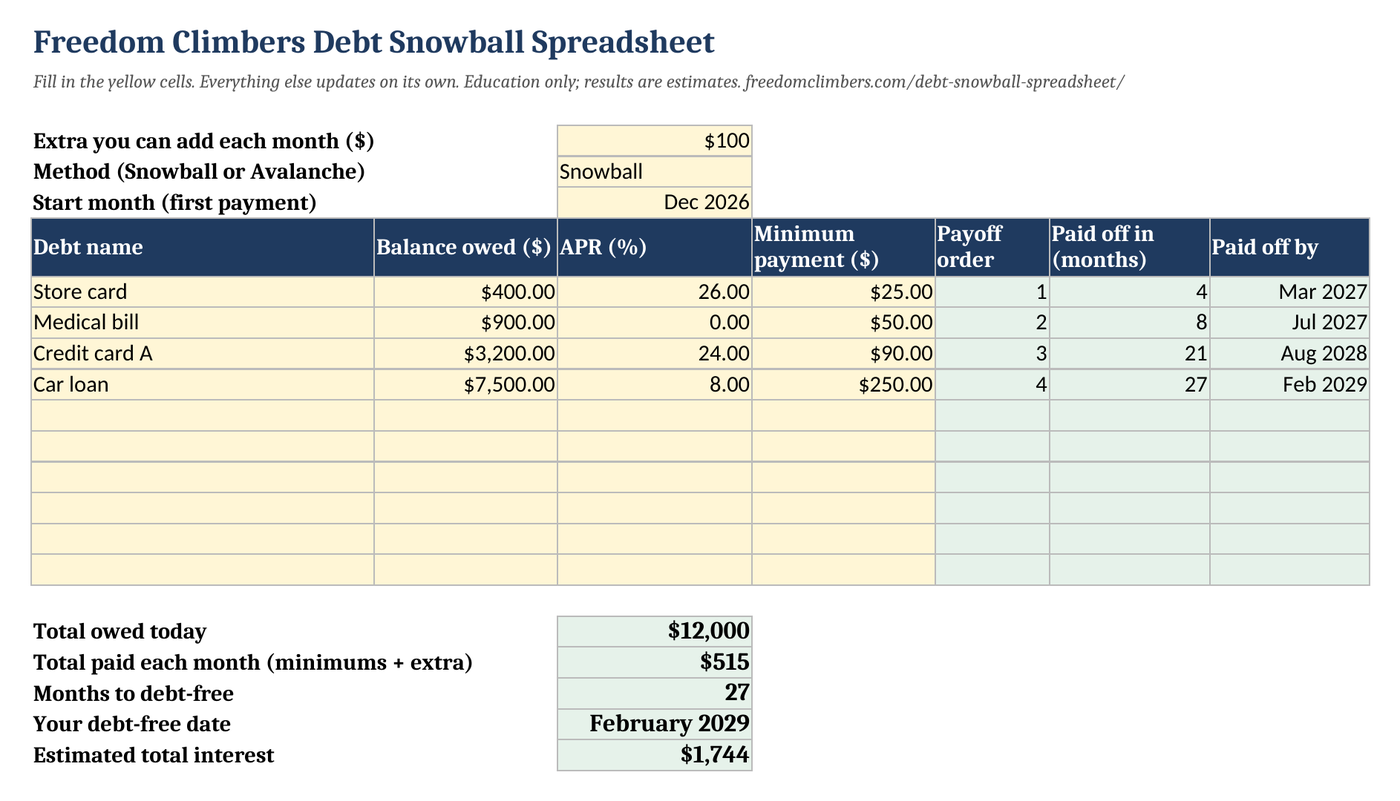
- My Debts tab: room for up to 10 debts. You fill in the yellow cells: name, balance, APR and minimum payment.
- Three settings: the extra amount you can add each month, Snowball or Avalanche, and the month of your first payment.
- Your results: the payoff order, the month each debt is paid off, your debt-free date and an estimate of the total interest.
- Schedule tab: the month-by-month math, for anyone who likes to peek under the hood.
How to fill it in (3 steps, about 15 minutes)
- Gather your numbers. Grab your latest statements or log in to each account. If you’ve already made your one-page debt list, you’re halfway there. If a balance on your credit report doesn’t match your statement, dispute it with our credit dispute letter template before you treat it as a real debt. APR is the yearly interest rate, and the CFPB notes that credit card interest rates are usually stated as a yearly rate called the APR. Type it as a plain number, like 24 for 24%.
- Delete the sample rows and type in your debts. The file comes with four made-up debts so you can see how it works. Replace them with yours, in any order. The sheet sorts them for you.
- Set your extra amount. Even $25 counts. Change it and watch the debt-free date move. That moment is the whole point: you can see what each extra dollar does.
A worked example: snowball vs. avalanche vs. minimums only
Here’s one example with made-up, round numbers. They’re the sample rows that come in the file, so you can check every number below yourself. Someone owes four debts, $12,000 in all. Their minimums add up to $415 a month.
| Debt | Balance | APR | Minimum payment |
|---|---|---|---|
| Store card | $400 | 26% | $25 |
| Medical bill | $900 | 0% | $50 |
| Credit card | $3,200 | 24% | $90 |
| Car loan | $7,500 | 8% | $250 |
| Total | $12,000 | $415 |
We ran the same four debts three ways. For snowball and avalanche, they add $100 a month on top of the minimums, so they pay $515 every month, no matter what. When a debt is gone, its payment rolls to the next one. For comparison, the third column pays only the minimums: no extra, and when a debt is paid off, that money isn’t rolled anywhere.
| Snowball | Avalanche | Minimums only | |
|---|---|---|---|
| Per month | $515 | $515 | $415, then less |
| Store card gone (month) | 4 | 4 | 20 |
| Medical bill gone (month) | 8 | 18 | 18 |
| Credit card gone (month) | 21 | 21 | 63 |
| Car loan gone (month) | 27 | 27 | 34 |
| Debt-free in | 27 months | 27 months | 63 months |
| Interest | $1,744 | $1,646 | $3,436 |
| Total paid | $13,744 | $13,646 | $15,436 |
What the table shows
- Adding $100 and rolling payments forward is the big win. Either plan finishes 36 months sooner than minimums only and saves about $1,692 (snowball) to $1,790 (avalanche) in interest.
- Avalanche costs the least. It saves about $98 more interest than snowball here, and both finish in month 27.
- Snowball gives faster wins. The medical bill is gone in month 8 instead of month 18, so you have two debts crossed off within the first 8 months.
- Minimums only drags on. The 24% credit card takes 63 months, because most of its $90 minimum goes to interest at first.
Neither snowball nor avalanche is wrong. One saves a little more money, and the other gives you quick wins that can keep you going. If motivation is your weak spot, read how to stay motivated paying off debt. For a deeper look at the two methods, see our debt snowball vs. avalanche guide.
One honest note: the sheet estimates interest monthly as APR divided by 12. Your lender may figure it a little differently (many cards use a daily balance), so treat the dates as a guide, not a promise.
How the formulas work
You never have to touch a formula. But if you like to know what’s happening under the hood, here’s the whole idea in plain English.
- Payoff order (My Debts, column E). Each debt gets a sort key. On Snowball, the key is the balance, so the smallest balance goes first. On Avalanche, the key puts the highest APR first, and a smaller balance wins a tie. The sheet then ranks the keys 1, 2, 3 and so on.
- Interest each month (Schedule tab). Each debt’s balance grows by its APR ÷ 12. At 24% APR, that’s 2% a month, so $3,200 adds $64 of interest in month 1.
- Minimums first. Every debt gets its minimum payment, or the rest of the balance if that’s smaller.
- The extra pool. Your total monthly payment (all minimums plus your extra) minus the minimums actually paid is the “extra pool”. It all goes to the first debt in the payoff order that still has a balance. If that debt is paid off with money left over, the rest spills to the next one. That’s the snowball rolling.
- Paid off in (column F). The sheet counts the months a debt still has a balance, plus one. If a debt is still open after 360 months, it shows “30+ years”.
- Your debt-free date. The longest payoff time among your debts, counted from the start month you entered.
- Estimated total interest. The sum of every month’s interest across all your debts.
Because the total payment stays the same every month, the payment you free up when a debt disappears is never “spent”. It keeps working on the next debt. That one rule is why the snowball and avalanche columns finish so much faster than minimums only.
Two quick ways to make the numbers smaller before you fill in the sheet: ask your card company for a lower interest rate, and if one row is a medical bill, see our guide on how to negotiate medical bills and the free Hospital Bill Negotiation Kit (letters and call scripts). Then update the balance and APR columns.
If the math doesn’t work
Sometimes the sheet says “30+ years,” or your minimums alone are more than you can pay. That’s not a failure. It’s information. Cover essentials first: housing, utilities, food and getting to work. Then, as the CFPB advises, if you can’t pay your credit card bills, contact your card company right away and explain what you can afford and for how long. A nonprofit credit counseling agency is another option, but ask about any fees before you sign up. Our hardship call script can help with that first call.
Want the whole Debt Payoff Starter Kit?
The spreadsheet above is yours free, no sign-up. If you’d also like the payoff tracker printable, the hardship call script and a one-page “first 30 minutes” guide in one download, tell us where to send it.
Debt snowball spreadsheet FAQ
Is the spreadsheet really free?
Yes. Download it above. There’s no email, sign-up or payment needed, and you can keep using it as long as you like.
Does it work in Google Sheets?
Yes. Upload the .xlsx file to your Google Drive, open it with Google Sheets, then choose File > Save as Google Sheets to get your own editable copy. It also opens in Excel and in free LibreOffice.
Which saves more money, snowball or avalanche?
Avalanche (highest APR first) usually costs the least interest. In the example above it saved about $98. Snowball (smallest balance first) can cost a bit more but gets debts off your list sooner. The CFPB explains both methods. The best plan is the one you’ll stick with, and the spreadsheet lets you switch with one cell.
Why does it say “30+ years” or “Raise payment”?
It means at least one debt won’t be paid off within 360 months at the payment you entered. Usually the minimum barely covers the interest. Try a bigger extra amount to see what it takes, and see “If the math doesn’t work” above for what to do if you can’t pay more right now.
How accurate is my debt-free date?
It’s an estimate. The sheet assumes the same payment every month, no new charges or fees, and interest of APR ÷ 12 on the balance. Your lender may calculate it differently. Update your real balances once a month, and the date will stay close.
What if one of my debts has a 0% promo rate?
Enter 0 for now. The sheet uses one rate per debt, so it doesn’t know when a promo ends. When the rate changes, type in the new APR and the plan updates. If a promo ends soon, it may make sense to pay that debt down before it does.
Can I list more than 10 debts?
The sheet has 10 rows. If you have more, start with the 10 you’re working on now, and add the rest as debts drop off.
Your climb this week
Open the file, put in one debt tonight and the rest by the weekend. Then update the balances once a month, on the same day you pay. Watching that date creep closer is one of the best feelings on the trail.
Next climb: Want a quick answer without a download? Try our debt payoff calculator or see every guide in the Debt Payoff Hub.
Next on the climb: if a row is already in collections, use our fill-in pay for delete letter, with honest odds and what to do if they say no.



Leave a Reply